Device Details
Overview
| Name | Version: | DIFF Devices - D-ESS 1.0 |
| Author: | DiffDevices |
| Device Type: | Audio Effect |
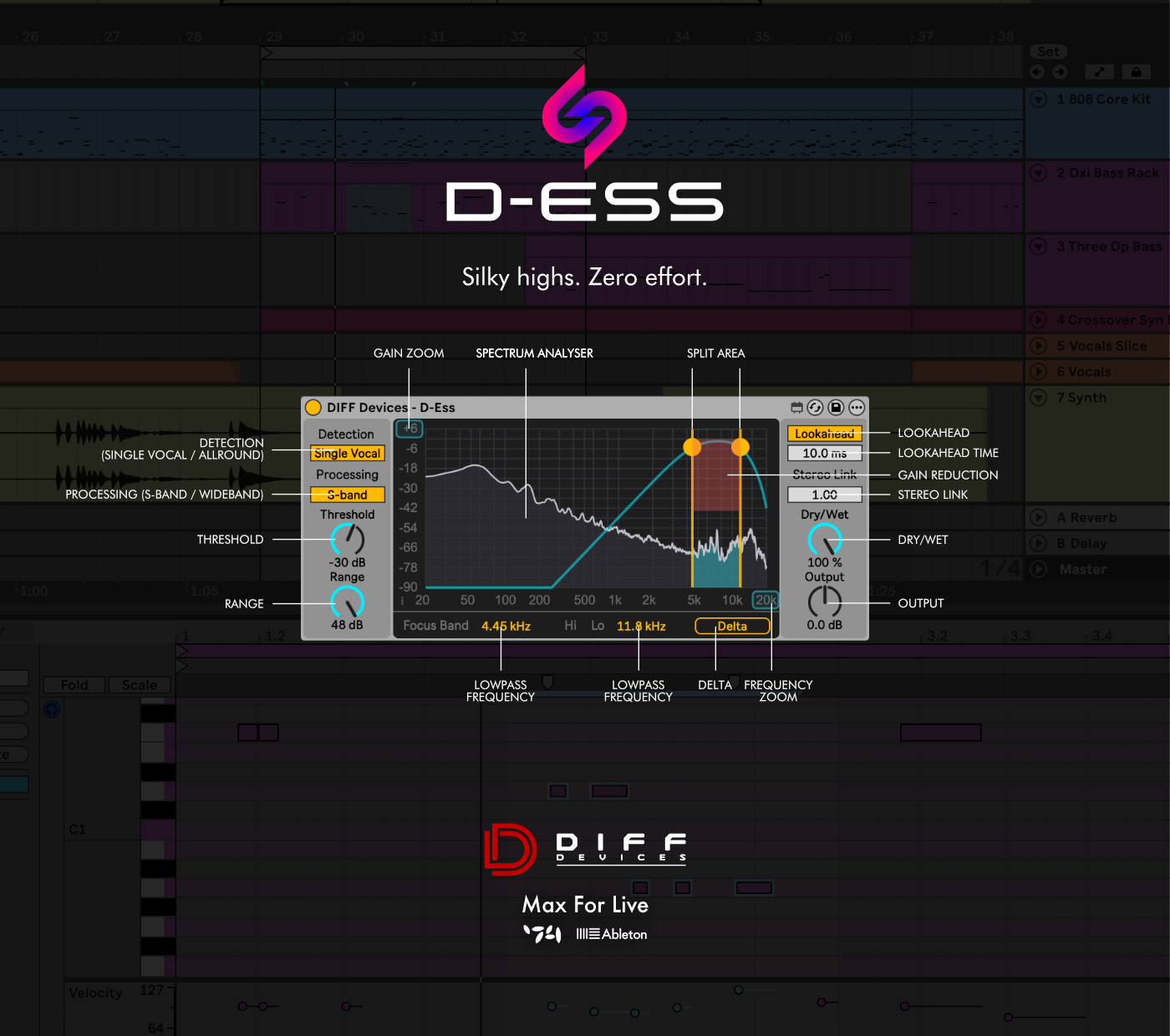
| Description: | DIFF Devices – D-ESS D-ESS is a precision sibilance control device designed to deliver transparent, intelligent de-essing while preserving vocal clarity, articulation, and tonal balance. Built around a smart, band-focused detection engine combined with phase-coherent crossover filtering, d-ess goes beyond traditional de-essers by distinguishing between true sibilance and vocal body energy. Instead of simply compressing high frequencies, it dynamically identifies and reduces harsh consonants while maintaining the natural presence and intelligibility of the performance. The device combines advanced dynamic processing with real-time spectral visualization, allowing you to see exactly where sibilance lives and how it is being controlled. By aligning visual feedback with what you hear, d-ess enables confident, surgical adjustments even in less-than-ideal monitoring environments. Using both intelligent detection and precision filtering, d-ess ensures every reduction is controlled, musical, and transparent — whether applied subtly for polish or aggressively for corrective work. FEATURES • Smart Vocal Detection Single Vocal mode analyzes sibilance against the vocal body, reducing harsh consonants while avoiding vowel dulling. • Dual Detection Modes Choose between Allround detection for general use or Single Vocal SMART mode for vocal-optimized behavior. • Peak & RMS-Style Detection Switch between ultra-fast peak detection or smoother RMS-style energy tracking for more natural control. • WideBand & S-Band Processing Apply gain reduction to the full signal (WideBand) or restrict reduction to a defined frequency band (S-Band Only). • Adjustable Focus Band Precisely define the sibilance range using high-pass and low-pass crossover controls. • Phase-Coherent LR4 Filtering Linkwitz-Riley 24 dB/oct crossover topology ensures clean band separation and perfect phase summing. • Lookahead Control Pre-react to sibilants for smoother, more transparent reduction without transient distortion. • Adaptive Envelope Shaping Adjustable attack and release controls allow tailoring from tight corrective action to smooth musical control. • Stereo Link & Mid/Side Targeting Control how detection behaves across stereo channels, including Mid-only or Side-only processing options. • True Removed Monitoring Audition exactly what is being removed from the signal to fine-tune threshold and band settings with confidence. • True Dry / Wet Architecture Blend processed and unprocessed signal seamlessly without tonal or phase shifts. • Clickless Parameter Smoothing All continuous parameters and routing states are fully smoothed to prevent clicks and artifacts. • Real-Time Spectrum Analyzer High-resolution spectrum display with adjustable dB scaling and band highlighting for visual precision. • Gain Reduction Meter Single, unified gain reduction meter with consistent dB scaling for clear visual feedback. • Optimized Performance Efficient DSP architecture with cached filter coefficients and stable smoothing behavior for reliable real-time performance. WHAT’S NEW IN VERSION 1.0 • Initial release • SMART Single Vocal detection engine • RMS-style detector option • Phase-coherent LR4 band processing • True Removed monitoring output • Lookahead processing • Mid/Side processing targeting • Real-time spectrum visualization • Clickless smoothing architecture • Optimized for real-time performance INSTALLATION & USAGE GUIDE Inside the zip file you will find: DIFF Devices – D-Ess.amxd Installation Steps: 1 Save the .amxd file anywhere on your computer or inside your Max for Live devices folder. 2 Drag and drop DIFF Devices – D-Ess onto an audio track in Ableton Live (recommended for vocals, dialogue, or any sibilant material). 3 Click the Save (floppy disk) icon in the device header. 4 The device will be stored in your User Library as an .adv preset for future sessions. 5 Load d-ess directly from your User Library whenever needed. Tip: For vocal processing chains, d-ess typically performs best: • After corrective EQ • Before saturation or limiting • Before final bus compression if used for precise control For bus de-essing, use moderate range settings and S-Band processing for transparent results. SYSTEM REQUIREMENTS • macOS & Windows • Works exclusively in Ableton Live with Max for Live • Requires Ableton Live 11 or later • Apple Silicon (M1 / M2 / M3) compatible |
Details
| Live Version Used: | 12.0.5 |
| Max Version Used: | 8.6.2 |
| Date Added: | Feb 11 2026 18:40:13 |
| Date Last Updated: | No Updates |
| Downloads: | 0 |
| Website: | http://www.payhip.com/diffdevices |
| ⓘ License: | Commercial |
Average Rating
Log in to rate this device |
-n/a- |
Login to comment on this device.
Browse the full library